Most small and mid-sized businesses did not buy the cheapest Microsoft 365 tier. They bought Microsoft 365 Business Premium, often on the advice of an IT provider, precisely because it was the plan that included security. Then the security stayed in the box.
Business Premium is one of the best security values Microsoft sells to organizations under 300 users. It bundles capabilities that, a few years ago, only enterprises with dedicated security teams could reach. The problem is not the license. The problem is that owning the license and operating the protection are two very different things, and most tenants are paying for the first without ever getting the second.
What Business Premium actually includes
Depending on Microsoft's current packaging, a Business Premium subscription typically gives you:
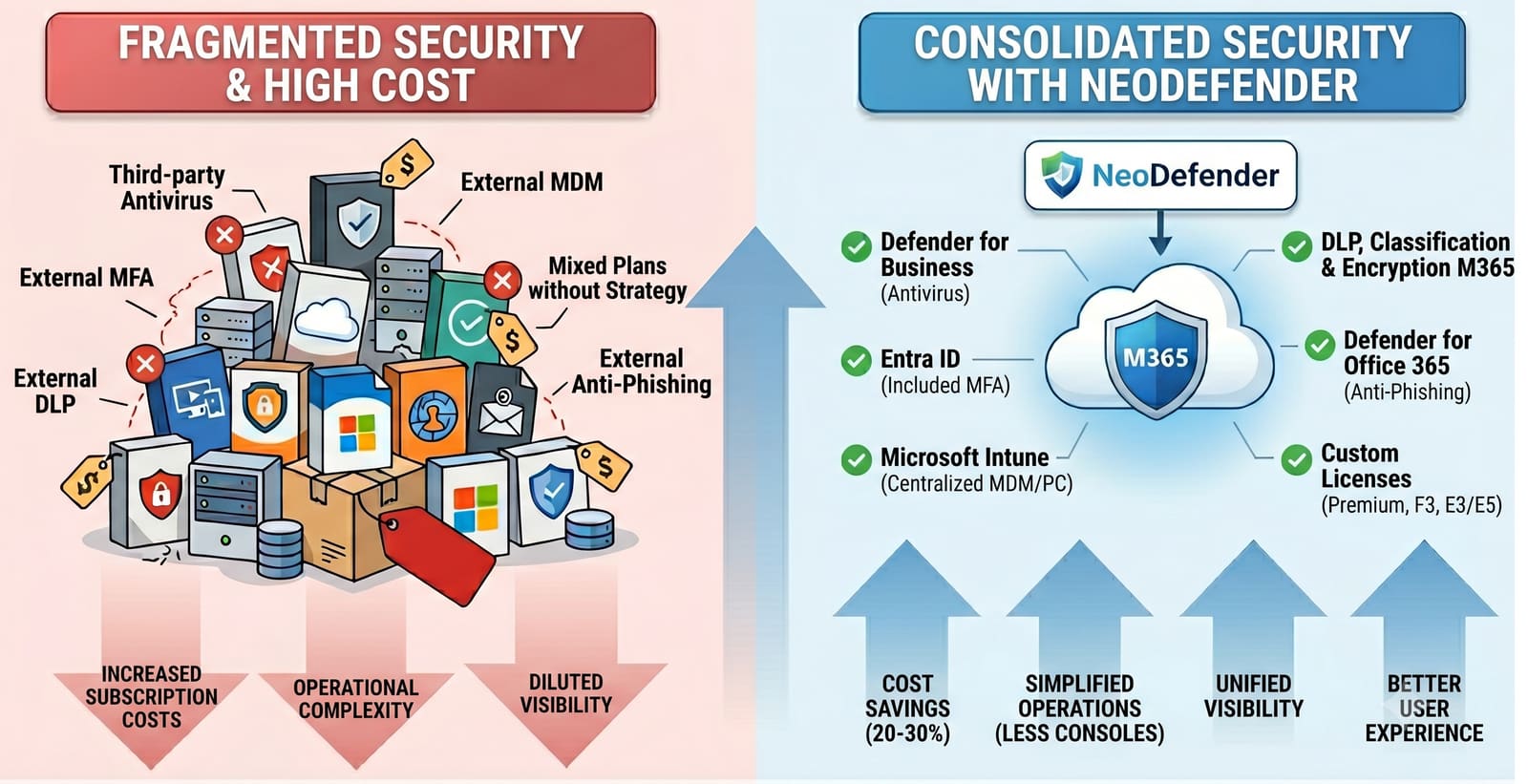
- Microsoft Entra ID P1 — Conditional Access, self-service password reset, and risk-aware access policies. This is the engine that decides who can sign in, from where, on what device, and under what conditions.
- Microsoft Defender for Business — endpoint detection and response with next-generation antivirus for your Windows, Mac, and mobile devices. Not consumer antivirus. Actual EDR.
- Microsoft Defender for Office 365 Plan 1 — Safe Links, Safe Attachments, and advanced anti-phishing for email and Teams.
- Microsoft Intune — device management and app protection, so a lost laptop or an unmanaged phone is not an open door.
- Microsoft Purview capabilities — sensitivity labels, data loss prevention, and message encryption to keep sensitive information from leaving the organization.
That is a genuine security stack. The uncomfortable part is what happens to it after purchase.
Why it is off by default
Microsoft ships capability, not configuration. The defaults are designed so that nothing breaks on the day the license is assigned, not so that your tenant is hard to attack. Conditional Access policies do not create themselves. Defender for Business does not onboard your devices on its own. Safe Attachments does not tune its own policies. Sensitivity labels do not appear until someone designs them.
So the tools sit dormant. The tenant technically has enterprise-grade security, and functionally runs something close to the free tier. Nobody sends you an alert saying the protection you are paying for was never switched on.
What "turned off" looks like in a real tenant
When we review a Business Premium environment, the same gaps appear again and again:
- Conditional Access is empty or minimal. MFA may be enabled, but there are no policies blocking legacy authentication, requiring compliant devices, or restricting risky sign-ins. Entra ID P1 is paid for and unused.
- Defender for Business is licensed but not onboarded. Devices are not reporting, so there is no EDR telemetry, no automated investigation, and no response, only a dashboard nobody enrolled.
- Defender for Office 365 policies are on default settings. Safe Links and Safe Attachments exist but have never been tuned to the organization's real risk, so phishing still lands.
- Intune is not enrolling devices. Personal phones with company mail have no app protection, and a lost laptop cannot be wiped.
- No sensitivity labels or DLP. Confidential data moves freely to personal accounts and cloud apps because nothing classifies or restricts it.
Each of these is a control the business already paid for, sitting switched off.
You are paying enterprise prices for consumer protection
This is the part that should bother a business owner. Business Premium is priced as a security plan. If the security is not configured, you are carrying the cost of enterprise-grade tooling while carrying the risk of an unprotected tenant. You get the invoice without the outcome.
The fix is rarely to buy more. In most Business Premium tenants we assess, the highest-impact security improvements for the next quarter require zero additional licensing. They require someone to design and turn on what is already there.
How NeoDefender turns the license into a security posture
NeoDefender does not start by enabling every feature at once, which is how well-intentioned security projects generate a flood of helpdesk tickets and get rolled back. We start by understanding how the business actually operates.
- Discover: Inventory what Business Premium entitles you to, what is configured, and where the gaps are, across identity, email, devices, and data.
- Design: Prioritize the controls that reduce the most risk for your specific business, and sequence them so productivity is preserved.
- Validate: Deploy Conditional Access and DLP in report-only mode, onboard devices in pilot groups, and confirm the impact before enforcement.
- Modernize: Turn on protection in the right order, monitoring effect and refining exceptions instead of flipping every switch on day one.
- Monitor: Track policy coverage, device onboarding, alert quality, and exceptions so the posture stays effective as the business grows.
The goal is simple: make the license you already own actually protect the business.
If you are on Business Premium, the most valuable security question you can ask this quarter is not "what should we buy next." It is "what are we already paying for that was never turned on."
Contact NeoDefender for a review of your Business Premium tenant, and find out exactly which protections you own and never activated.